
I'm Not Seeing All of My Stores on the Locator
You've added locations to the Store Locator, but they aren't showing up fully or at all on your website? Here are the most common reasons why this might happen.
1. Your Subscription May Be Inactive
Your plan might have expired or been paused. Check your subscription status on the Plans page in the app.
2. R+ Store Locator Helper Is Not Enabled on Your Theme
The app embed may be turned off for your active theme. To enable it:
- In your Shopify admin, go to Online Store → Themes.
- Find the theme you want to edit and click Customise.
- In the sidebar, click the App embeds icon.
-
Find R+ Store Locator Helper in the list and toggle it on.
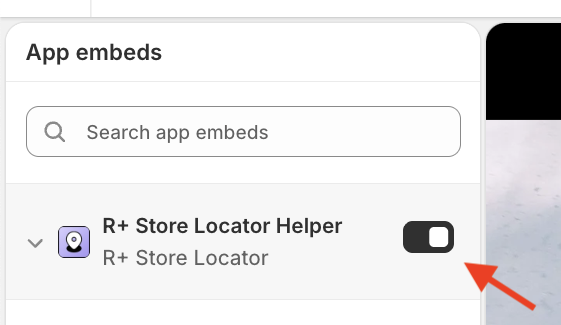
- Click Save.
3. Your Locations Are in Draft Status
Only Active locations are displayed on the locator. To activate your locations:
- Go to the Locations page in the app.
- Check that all the locations you need are set to Active.
-
If any are in Draft status, select them in the table and click Set as Active.

Learn more about managing Locations in this article.
Do you need help?
If you have any questions or run into issues, please contact us — we’re happy to help.