
R+ Store Locator Helper
R+ Store Locator Helper is a global JavaScript object injected into your theme by the Shopify App Embed Extension. Once activated, it provides access to the following data and features:
- All store locations and their metafields
- Product variant availability across stores
- Customer favourite stores (via Shopify Customer Metafield for authenticated users, or
localStoragefor guests) - Google Maps API key
- Search analytics events
The helper works on all modern browsers and devices. All methods are available via the global object:
window.refactor_apps.store_locator
To verify the helper is active, run this in the browser console:
const { locations } = await window.refactor_apps.store_locator.getLocations(); console.log(`This array has ${locations.length} locations`);
How to enable R+ Store Locator Helper
The helper object is only available in themes where the R+ Store Locator Helper App Embed Extension has been activated.
To activate the extension:
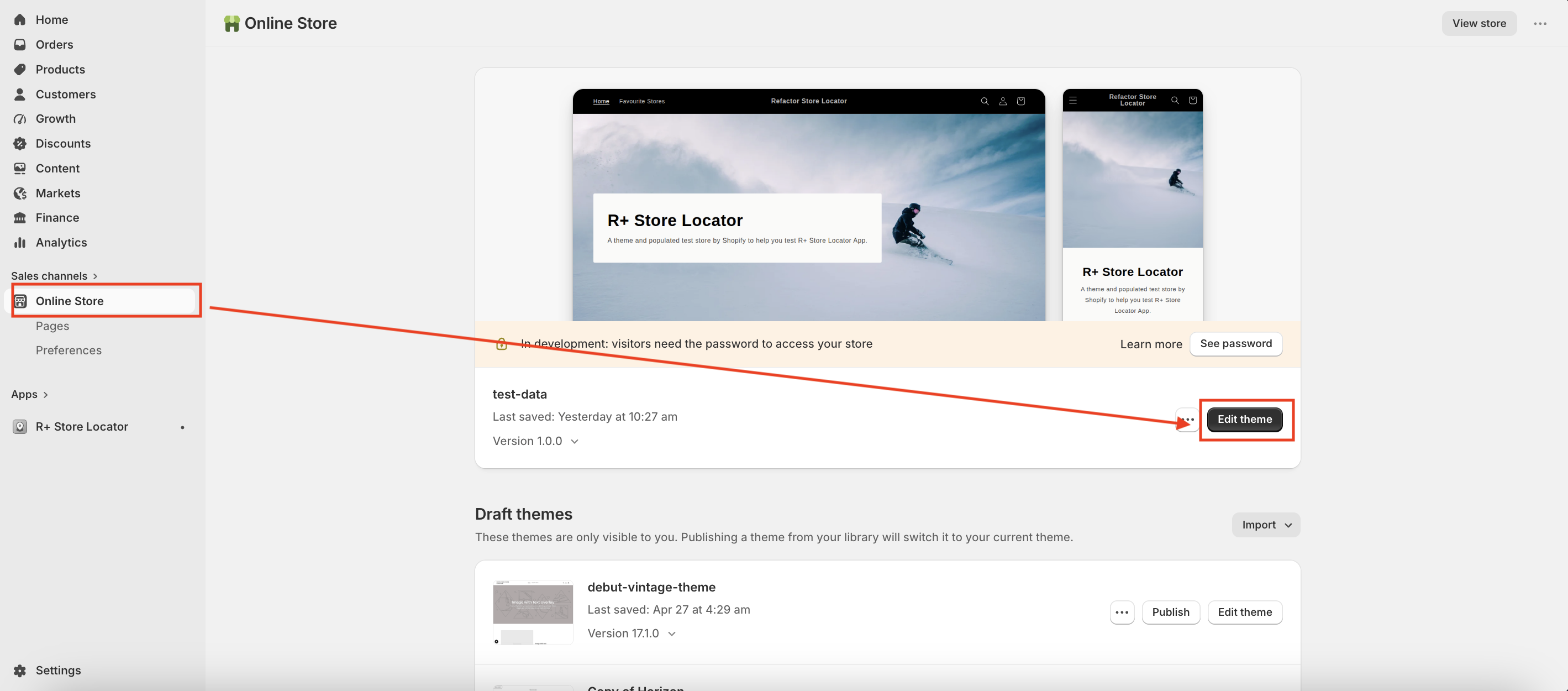
- In your Shopify admin, go to Online Store → Themes.
-
Find the theme you want to edit and click Edit theme.
- In the sidebar, click the App embeds icon (the puzzle piece icon in the left sidebar).
- Find R+ Store Locator Helper in the list and enable it.
-
Click Save.
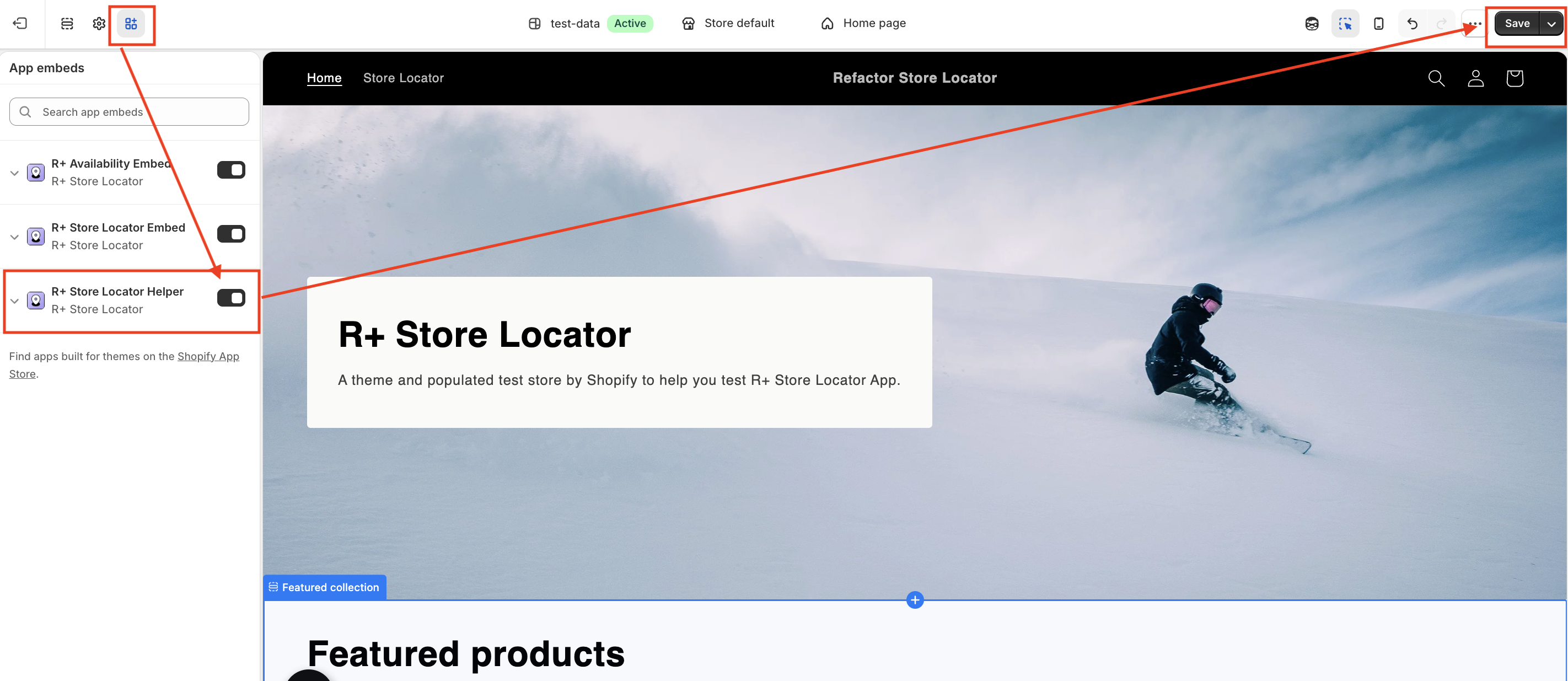
After saving, window.refactor_apps.store_locator will be available in all JavaScript running within that theme.
Note: The extension must be activated separately for each theme you want to use it in. If you switch themes, make sure to re-enable the app embed.
JavaScript API
Method: getLocations()
Returns all store locations.
Parameters: none
Returns: Promise<{ locations: Array<Location> }>
Each location object contains: id , isActive , address , metafields , metafieldNodes .
Throws: Error if the network request fails or returns a non-OK status.
const data = await window.refactor_apps.store_locator.getLocations(); console.log(`This array has ${data.locations?.length} locations`);
Method: getVariantStoreAvailability(variantId, coords?)
Returns in-store availability for a given product variant. Pass coordinates to sort results by proximity.
Parameters:
| Name | Type | Required | Description |
|---|---|---|---|
variantId |
string |
✅ | Numeric variant ID without the GID prefix (e.g. "41085200498821" ) |
coords |
{ latitude?: number, longitude?: number } |
❌ | Optional coordinates for proximity sorting |
Returns: Promise<{ variant: { variantId: string, storeAvailability: Array<StoreAvailability> } }>
Throws: Error if the network request fails or returns a non-OK status.
const data = await window.refactor_apps.store_locator.getVariantStoreAvailability("41085200498821", { latitude: 40.7128, longitude: -74.0060 });
Method: getFavoriteStores()
Returns the customer's saved favourite store IDs. Uses Shopify Customer Metafield for authenticated customers, or localStorage for guests.
Parameters: none
Returns: Promise<Array<string>> — array of location IDs
const favorites = await window.refactor_apps.store_locator.getFavoriteStores(); console.log(favorites); // ['87448682746', '88759075066']
Method: setCustomerFavoriteLocation(locationId)
Adds a store to the customer’s list of favourite stores. Uses Shopify Customer Metafield for authenticated customers, or localStorage for guests.
Parameters:
| Name | Type | Required | Description |
|---|---|---|---|
locationId |
string |
✅ | Numeric location ID without the GID prefix |
Returns: Promise<Array<string>> — updated array of favourite location IDs
const favorites = await window.refactor_apps.store_locator.setCustomerFavoriteLocation('47891250020602'); console.log(favorites); // ['47891250020602']
Method: unsetCustomerFavoriteLocation(locationId)
Removes a store from the customer's list of favourite stores. Uses Shopify Customer Metafield for authenticated customers, or localStorage for guests.
Parameters:
| Name | Type | Required | Description |
|---|---|---|---|
locationId |
string |
✅ | Numeric location ID without the GID prefix |
Returns: Promise<Array<string>> — updated array of favourite location IDs
const favorites = await window.refactor_apps.store_locator.unsetCustomerFavoriteLocation('47891250020602'); console.log(favorites); // []
Method: getApiKey()
Returns the Google Maps API key configured in the app admin panel. Use this if you want to initialize your own map instance instead of using the built-in extension block.
Parameters: none
Returns: Promise<string>
const apiKey = await window.refactor_apps.store_locator.getApiKey(); console.log(apiKey); // AIzaSyBKyZ1hAn8w2xa4BDANIud9flaMU6O
Method: saveSearchAnalytics(params)
Sends a search event to the built-in analytics route.
Parameters:
| Name | Type | Required | Description |
|---|---|---|---|
city |
string |
❌ | City entered in the search |
country |
string |
❌ | Country entered in the search |
latitude |
number |
❌ | Search coordinates |
longitude |
number |
❌ | Search coordinates |
storeId |
string |
❌ | ID of the selected store (or the closest store, if none is explicitly selected) |
Returns: Promise<void>
window.refactor_apps.store_locator.saveSearchAnalytics({ city, country, latitude, longitude, storeId: closestStoreId, }).catch((err) => console.error("[R+ Store Locator] Analytics error:", err));
Customer Metafield reference
Favourite locations for authenticated customers are stored in a Shopify Customer Metafield:
| Property | Value |
|---|---|
| Namespace | refactor_store_locator |
| Key | fav_store |
| Type | list.single_line_text_field |
The value is a JSON array of location GIDs:
["gid://shopify/Location/88759075066", "gid://shopify/Location/87448682746"]
This can also be accessed directly in Liquid:
{% if customer %} {% assign customer_favorite_stores = customer.metafields.refactor_store_locator.fav_store.value | json | escape %} {% endif %}
Do you need help?
If you have any questions or run into issues, please contact us — we’re happy to help.